February 06, 2023

BDD with BDD full form (BDD stands for) | BDD Cucumber | BDD meaning | BDD testing | BDD vs TDD

Do you want to know the difference between BDD, TDD and ATDD? View my BDD, TDD and ATDD video or read this blog post.

 
In this blog post, I will explain what is BDD, what is Test Driven Development and ATDD vs TDD. BDD full form is Behavior Driven Development. Here is a Behavior Driven Development example. A Feature is a higher-level functionality provided by the system so for example a Feature can be place an order. A User Story explains the system behavior in non-technical language that everybody on the team can understand. The example of a User Story for the place an order Feature is As a customer I want to be able to place an order on the e-commerce website so that I can purchase the items that I need. 
 In the Cucumber Test there is the Scenario, which gives us steps and expected results of a test. So for example, the Scenario is successfully place an order. Given means the preconditions of the Scenario so Given a customer is on the website And the customer has added items to their shopping cart. When means the actions or operations or the steps of the test. When the customer clicks the checkout button. Then means the expected result. Then the order is successfully placed. In Java, this User Story may be implemented by using a public class like OrdersUtility, which is going to have a public method called placeOrder and it needs an Item object and the Customer object. There is a list of items placed by the customer in their shopping cart and a customer. So using a list of item objects and the customer object, the developers have to write the code to process in order and update the database.
 
BDD stands for Behavior Driven Development. BDD is used in Agile software development. As introduction to Behavior Driven Development, you should know that its focus is on system behaviors or application behaviors. BDD uses User Stories that explain the system behavior in a non-technical language. BDD testing uses Tests to verify those system behaviors. In BDD, the common Behavior Driven Development software testing tools are Cucumber that allows tests to be written in English. Cucumber may be used in a BDD Cucumber framework with Selenium. JBehave is used for testing web applications. SpecFlow is a tool for testing .NET applications. JBehave and SpecFlow allow tests to be written in a natural language syntax. 
 
TDD full form is Test Driven Development. The focus of Test Driven Development in software engineering is on system requirements and to write code so that it is simple to test the individual components. Test Driven Development vs Behavior Driven Development uses functional requirements and tests. Also, the common testing tools are different in Behavior Driven Development vs Test Driven Development or BDD vs TDD. In TDD the common testing tools are JUnit for testing Java applications or NUnit for testing.NET applications. If you want to know ATDD vs TDD, ATDD full form is Acceptance Test Driven Development. In Acceptance Test Driven Development ATDD, the focus is on system requirements of the whole system, which is different from TDD's focus on requirements of individual components. ATDD uses Acceptance Criteria which is commonly documented as User Stories and Acceptance Tests. In ATDD, the Acceptance Tests are written before writing the code that would pass those Acceptance Tests. The common testing Tools in ATDD include FitNesse, which allows writing Acceptance Tests in natural language syntax, Cucumber or JBehave. 
 
I hope that you know BDD meaning and have an idea about BDD Behavior Driven Development, ATDD and Test Driven Development TDD in Agile. If you want to understand BDD with more examples, please view my BDD video. Thank you!
January 30, 2023

Agile Backlogs: Understanding Product, Sprint and Bug Backlogs

Are you a QA, Software Engineer or Product Owner who wants to understand backlogs in Agile and Scrum? View my Backlog Agile video or read on.

Agile development is about adaptability, collaboration and continuous delivery of value to the customer. Agile uses the concept of backlogs. I will explain what is Backlog in Agile and Scrum, what are the types of Backlogs in Agile methodology, the relationship of Agile Product Backlog to Bug Backlog and Agile Product Backlog vs Sprint Backlog, who writes the backlog items in Agile and where to put bug fixes in Agile.

First, what is Backlog in Agile? It is pending work that will bring value to the customers. It is a list of items that need to be completed in the project and includes features, user stories and other tasks. What are features in Agile Scrum backlog? They are higher level functionalities provided by the system, for example a feature for users to customize their profiles and another feature to give personalized recommendations to users based on their past transactions. What are user stories? A user story explains a software feature in non-technical or business language. What are the other tasks in Agile Product Backlog? They are tasks to achieve the project goals but each task should provide value to the users for example refactor the code to improve performance, update the test scripts, system testing or QA testing focusing on functional testing and performance testing or update user documentation. 

There are three types of backlogs in Agile:

1) The primary or biggest backlog in Agile is the Product Backlog. It contains all the items that need to be done in the project, and it's the responsibility of the Product Owner to add items to it and prioritize them by business value. 

2) The Sprint Backlog is a smaller backlog. It contains all the items that need to be done in the current sprint. The Developers select items from the Product Backlog, estimate the efforts and add them to the Sprint Backlog.

3) When it comes to bug fixes, the Agile approach is to address them as soon as they are discovered. The Bug Backlog is a list of all the known bugs that need to be fixed in the project. The Product Owner is responsible for prioritizing the bug fixes, based on their impact to the users and customers.

There are different ways to handle the Bug Backlog, depending on the team's preference. One approach is to keep the Bug Backlog separate from the Product Backlog. This allows the Product Owner to focus on prioritizing the bug fixes without being overwhelmed by other items in the Product Backlog. However, this approach also introduces more overhead work for the team.

The typical approach is to include the Bug Backlog within the Product Backlog. This approach simplifies the process of prioritizing bug fixes, as the Product Owner can address them alongside other items in the Product Backlog. However, this approach makes it more difficult to track the status of bugs, as they are mixed in with other items.

In order to manage the Bug Backlog, the team can use a tool like Jira to prioritize and track the Product Backlog Items (PBI). The Product Owner can create Product Backlog Jira by adding items, setting their priorities and assigning items and the progress can be tracked by the Agile Scrum Master, Developers and other team members. 

In conclusion, the create Backlog and Sprint in Agile process is that the Product Owner adds PBI's including bug fixes needed to Product Backlog, prioritizes each PBI and cleans up the PBI's, as needed. Then for each Sprint, the Developers select the PBI's, estimate them and commit to deliver them in the Sprint. I hope that now you know about Agile backlogs, which are Product Backlog, Sprint Backlog and Bug Backlog. Thank you 🙏

January 23, 2023

Alpha Testing and Beta Testing | Difference between Alpha and Beta Testing


Are you a QA, software engineer or product owner looking to improve your understanding of alpha and beta testing? View my Alpha Testing And Beta Testing video or read on.

In this blog post, I will dive into these two types of testing and explain the key differences between them.

Alpha testing and beta testing are both critical stages in the software development process, and it's essential to understand the purpose of each. In simple terms, alpha testing is the round of testing done in-house by a small group of testers, developers, users or even customers or prospects, while beta testing is a more extensive round of testing done by a larger group of users before a product's general release.

The goal of alpha testing is to identify any bugs or issues that may have been missed during the development process and to ensure that the product meets the requirements and specifications laid out in the initial design.

Once any issues identified during alpha testing have been fixed, the product is ready for beta testing. Beta testing is the final round of testing before a product's general release. It's done by a larger group of users, who are typically not part of the development team. The goal of beta testing is to identify any remaining issues and to get feedback on the product's usability, performance, and overall quality.

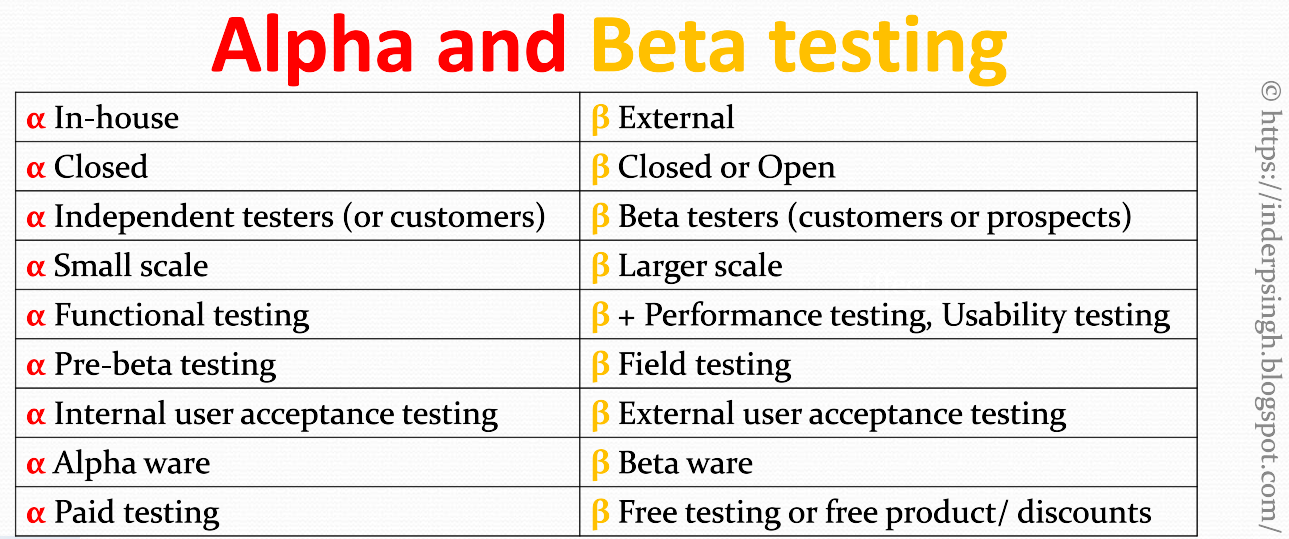
So, what are the key differences between alpha and beta testing? One main difference is the scope and scale of testing. Alpha testing is typically done by a small group of in-house testers, while beta testing is done by a larger group of users. Alpha testing focuses on identifying issues, while beta testing is more focused on getting real-world feedback and fine-tuning the product. Additionally, alpha testing is typically done before beta testing, and beta testing is done before the final release of the product. See the differences in the table below.

In conclusion, alpha testing and beta testing play important roles in the software development release cycle. After understanding the purpose of each, software developers and QA may leverage these types of testing to find out their product's quality before the general release.

Want to learn more? View Alpha Testing and Beta Testing video. Thank you!