January 23, 2023

Alpha Testing and Beta Testing | Difference between Alpha and Beta Testing


Are you a QA, software engineer or product owner looking to improve your understanding of alpha and beta testing? View my Alpha Testing And Beta Testing video or read on.

In this blog post, I will dive into these two types of testing and explain the key differences between them.

Alpha testing and beta testing are both critical stages in the software development process, and it's essential to understand the purpose of each. In simple terms, alpha testing is the round of testing done in-house by a small group of testers, developers, users or even customers or prospects, while beta testing is a more extensive round of testing done by a larger group of users before a product's general release.

The goal of alpha testing is to identify any bugs or issues that may have been missed during the development process and to ensure that the product meets the requirements and specifications laid out in the initial design.

Once any issues identified during alpha testing have been fixed, the product is ready for beta testing. Beta testing is the final round of testing before a product's general release. It's done by a larger group of users, who are typically not part of the development team. The goal of beta testing is to identify any remaining issues and to get feedback on the product's usability, performance, and overall quality.

So, what are the key differences between alpha and beta testing? One main difference is the scope and scale of testing. Alpha testing is typically done by a small group of in-house testers, while beta testing is done by a larger group of users. Alpha testing focuses on identifying issues, while beta testing is more focused on getting real-world feedback and fine-tuning the product. Additionally, alpha testing is typically done before beta testing, and beta testing is done before the final release of the product. See the differences in the table below.
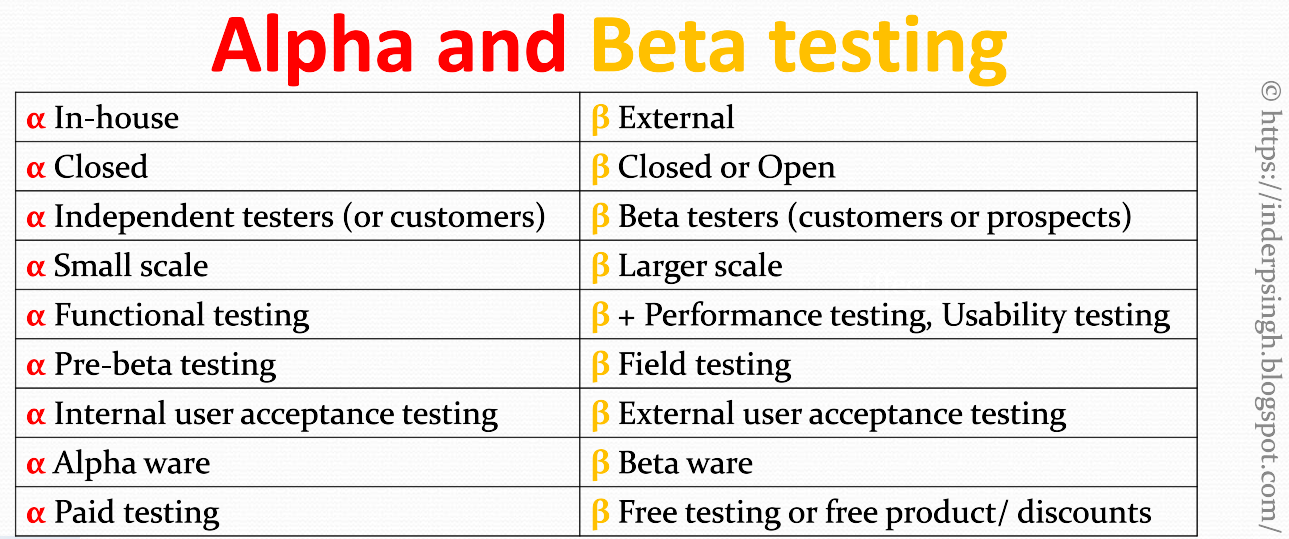
In conclusion, alpha testing and beta testing play important roles in the software development release cycle. After understanding the purpose of each, software developers and QA may leverage these types of testing to find out their product's quality before the general release.

Want to learn more? View Alpha Testing and Beta Testing video. Thank you!


March 13, 2022

Katalon The State of Quality Report 2022 Review and Download

Katalon has made The State of Quality Report 2022. This helpful report has important findings about Quality, Test Automation, Artificial Intelligence (AI) in Test Automation and the year 2022 for Quality Assurance. You can view a summary of this valuable report here or read on.

Katalon provides test automation tools and platform that can be integrated with other products. Katalon is well-known in the industry. Katalon tools are used in more than 100K enterprises by more than 1 Million testers and developers.

I explained the summary of The State of Quality Report 2022 in my 6-minute video above. But in brief, The State of Quality Report 2022 has four parts. These are Quality at speed, Test Automation, AI in Test Automation and 2022 expectations. In Quality at speed section, Katalon suggests test automation, code review, production testing, automated unit testing and shift left testing. In Test Automation section, Katalon found that test automation is used for regression testing, test cases generation, functional testing, test results analysis, test data generation, performance testing etc. Katalon also names the most popular test automation tools. In AI in Test Automation section, Katalon found that AI is in initial stages only. AI is being used for test script generation, test data generation, automated defect detection and test selection. AI in test automation is expected to increase. In 2022, Katalon expects that test automation would increase, QA practices would improve and AI technologies would enable tasks like test estimation, test repair etc.

Benefits to you? This 59-page report explains the quality state in detail. There are many recommendations that you may discuss with your QA team or suggest in interviews. You can download The State of Quality Report 2022 for free at the link, https://bit.ly/3fPXLgb

* You also get a chance to win a $30 E-gift card.

May 09, 2021

Orthogonal Array Testing in Software Engineering | Orthogonal Array Testing Example

Welcome to this post on Orthogonal Array Testing in software engineering. Orthogonal array testing is black box testing. When you have a large number of input combinations, orthogonal array testing gives very few test cases. View the below tutorial or read on...

What is Orthogonal Array? It is a table. The columns (a.k.a. factors) represent the independent variables. The rows (a.k.a. experiments or runs) represent the variables' combinations. The orthogonal array testing example below is for a web page with three sections - TOP, LEFT and RIGHT. Note that the orthogonal array has only 4 test cases to run for 8 input combinations.

What is Orthogonal Array Testing? The Orthogonal Array Technique has the following steps:

  1. Identify the independent variables. Put them as column headers in the table.
  2. For each independent variable, identify the number of possible values.
  3. Search an Orthogonal Array with the smallest number of rows in orthogonal array design of experiments. I have explained this step here.
  4. Put the independent variable values in the Orthogonal Array cells. If any cells are still blank, repeat the values in them.
  5. Test each row in the table.

In the example below, there are 3 independent variables (put as column headers). Variable A has 2 possible values, A1 and A2. Variable B has 3 possible values, B1, B2 and B3. Variable C has 3 possible values, C1, C2 and C3. The input combinations are therefore 2 * 3 * 3, which is 18. The smallest number of rows can be found in this orthogonal array. Using the above orthogonal array technique, the table should look like below. Instead of testing 18 input combinations, orthogonal array gives only 9 test cases to run.

Note: 1) Since variable A has only 2 values, they are used to complete the first column.
2) Since there are only 3 variables, the 4th column is not used.

Want to learn the above Orthogonal Array Testing examples in detail? Please view my Orthogonal Array Testing tutorial

Donate USD 1$ to me on PayPal

Note: Links are only welcome from supporting organizations or individuals. Other comments with links will be deleted. Thank you.